

Integrations
Companion
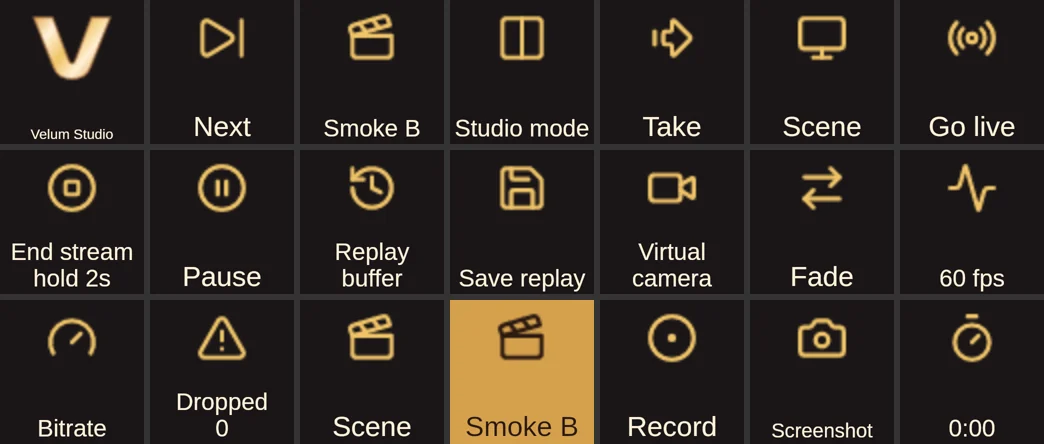
The Companion module builds its actions from the running Studio's own catalog, lights buttons from Studio's pushes, and keeps a preset library made from what your Studio has right now.
At a glance
- Version 0.2.0.
- Module id:
velum-studio, for Companion 5.0 and later. - Built on the TypeScript SDK, so it speaks the control API exactly as your own code would.
- Three ways to reach Studio: this computer through the discovery file (the default; nothing to type), this computer with the port and token typed in (for Companion running as another user or in a container), or another computer through pairing.
- Tokens stay secret. They're never logged or put in a variable, and typed-in and paired tokens live in Companion's secrets.
- A newer Studio's new actions appear when the module connects to it, without updating the module.
Actions
Every catalog action that suits a button becomes a Companion action, with its id's dots turned into underscores. This list is generated from Studio's catalog with the module's own rule:
| Companion action id | Name | Catalog id |
|---|---|---|
scene_switch | Switch scene | scene.switch |
scene_next | Next scene | scene.next |
scene_previous | Previous scene | scene.previous |
vertical_pin | Pin the vertical canvas | vertical.pin |
layer_visibility | Show or hide a layer | layer.visibility |
layer_restart | Restart a layer | layer.restart |
layer_freeze_on_air | Freeze when its scene comes on air | layer.freeze_on_air |
layer_copy_style | Copy a layer's style to another | layer.copy_style |
layer_opacity | Layer opacity | layer.opacity |
layer_clip | Clip to the layer below | layer.clip |
filter_toggle | Turn an effect on or off | filter.toggle |
filter_set | Set an effect's setting | filter.set |
layer_framing | Apply a framing | layer.framing |
layer_nudge | Nudge a layer | layer.nudge |
audio_mute | Mute | audio.mute |
audio_volume | Volume | audio.volume |
audio_monitor | Monitor | audio.monitor |
audio_monitor_when | Monitor when | audio.monitor_when |
audio_monitor_bus | Monitor bus | audio.monitor_bus |
audio_monitor_send | Monitor send | audio.monitor_send |
audio_app_volume | App volume in Windows | audio.app_volume |
audio_track | Audio track | audio.track |
veloq_visibility | What viewers get | veloq.visibility |
veloq_viewer_start | Where viewers start | veloq.viewer_start |
veloq_stem | Editor+ stem | veloq.stem |
veloq_group | Put in a folder or send | veloq.group |
veloq_slider_order | Who gets a slider first | veloq.slider_order |
veloq_transitions | Stinger sounds for viewers | veloq.transitions |
veloq_smart_defaults | Smart defaults | veloq.smart_defaults |
veloq_create_group | New audio folder or send | veloq.create_group |
veloq_update_group | Change an audio folder or send | veloq.update_group |
veloq_delete_group | Delete an audio folder or send | veloq.delete_group |
veloq_send_with | Send to Velora with | veloq.send_with |
source_copy_settings | Copy a source's settings to another | source.copy_settings |
source_record_separately | Record this source separately | source.record_separately |
source_set | Set a source's setting | source.set |
source_trigger | Trigger a source's action | source.trigger |
text_set | Set text | text.set |
source_remove_from_all_scenes | Remove a source from all scenes | source.remove_from_all_scenes |
source_delete_everywhere | Delete a source everywhere | source.delete_everywhere |
source_merge | Merge duplicate sources | source.merge |
mirror_show | Point a Mirror | mirror.show |
capture_targets | What a capture can show | capture.targets |
capture_set | Switch what a capture shows | capture.set |
media_control | Media control | media.control |
media_speed | Media speed | media.speed |
output_screenshot | Screenshot | output.screenshot |
record_start | Start recording | record.start |
record_stop | Stop recording | record.stop |
record_toggle | Record | record.toggle |
record_pause | Pause recording | record.pause |
replay_start | Start replay buffer | replay.start |
replay_stop | Stop replay buffer | replay.stop |
replay_toggle | Replay buffer | replay.toggle |
replay_save | Save replay | replay.save |
stream_golive | Go live | stream.golive |
stream_stop | End stream | stream.stop |
destination_select | Select destination | destination.select |
destination_start | Go live on a destination | destination.start |
destination_stop | End a destination's stream | destination.stop |
destination_reconnect | Reconnect a destination | destination.reconnect |
destination_audio | Audio sent | destination.audio |
vcam_start | Start virtual camera | vcam.start |
vcam_stop | Stop virtual camera | vcam.stop |
vcam_toggle | Virtual camera | vcam.toggle |
vcam_source | Virtual camera source | vcam.source |
ndi_start | Start NDI® output | ndi.start |
ndi_stop | Stop NDI® output | ndi.stop |
ndi_toggle | NDI® output | ndi.toggle |
source_ndi_send | Send a source over NDI® | source.ndi_send |
streaminfo_apply | Set title and category | streaminfo.apply |
raid_targets | Who's live to raid | raid.targets |
raid_start | Raid | raid.start |
raid_cancel | Cancel raid | raid.cancel |
captions_send | Send closed captions | captions.send |
chat_send | Send a chat message | chat.send |
chat_mode | Chat mode | chat.mode |
chat_clear | Clear chat | chat.clear |
automation_run | Run an automation | automation.run |
automation_enable | Turn an automation on or off | automation.enable |
variable_set | Set a variable | variable.set |
avatar_lipsync | Avatar lip sync | avatar.lipsync |
dynamic_set_variable | Set a Dynamic Sources variable | dynamic.set_variable |
collection_switch | Switch scene collection | collection.switch |
transition_set | Set the transition | transition.set |
transition_wait | Wait until the transition finishes | transition.wait |
scene_transition_override | Set a scene's transition | scene.transition_override |
studio_mode | Studio mode | studio.mode |
scene_preview | Preview a scene | scene.preview |
studio_take | Take | studio.take |
gpu_draw_on | Draw scenes on | gpu.draw_on |
gpu_encode_on | Encode on | gpu.encode_on |
network_stream_on | Stream on network card | network.stream_on |
update_check | Check for updates | update.check |
update_install | Install update | update.install |
raw_transaction | Raw request | raw.transaction |
Lists (scenes, sources, layers, effects, audio, audio folders and sends, media, automations, destinations, collections) are filled from your Studio; you can also type a name, or use a Companion variable or expression. Learn works on Volume, Set text and Set an effect's setting.
Feedbacks
From the module's own help:
Each feedback has a default look in Velum's palette, and you can change it:
- Scenes: scene on air (gold), scene in preview (green), and Tally (on air and preview in one; Velum gold or broadcast red).
- Stream: live (red), state is (connecting, live, reconnecting, offline, refused), Status (red with LIVE and the uptime, amber while starting or reconnecting), destination selected, destination live.
- Recording: recording (red), paused (amber), Status (red with REC and the length, amber while paused). Replay buffer running, virtual camera on.
- Transitions: studio mode on, transition playing.
- Audio: muted (red), monitoring, on a track.
- Effects and layers: effect on, layer visible, layer freezes on air, layer in a framing.
- VELoQ: what viewers get (a slider, in the VOD, sent at all, or one exact choice), viewers' slider starts muted (red), recorded as its own stem, in a folder or send (one, or any), stinger sounds for viewers. Velora sent with VELoQ or WHIP (and with how many qualities).
- Other: automation on, collection open, media state is, chat mode on, update on offer, Studio connected.
- Stats warning (amber): frames dropped while recording, frames rendered late, or stream reconnects within the last few seconds (10 by default); packet loss over a percentage; round trip over some milliseconds; frame rate under a number.
Variables
From the module's own help. Use them in button text as $(velum:name), with your connection's label in place of velum.
Use them in button text as $(velum:name) (with your connection's label in place of velum).
| Variable | What |
|---|---|
scene_program, scene_preview, scene_count |
The scene on air, the preview scene, how many scenes |
studio_mode, transition, transition_duration_ms, transition_playing |
Studio mode and the transition |
stream_state, stream_live, stream_time, stream_seconds, destination |
The stream: state, uptime (h:mm:ss), where it goes |
viewers, viewers_velora, viewers_twitch, viewers_kick, viewers_youtube, viewers_owncast, viewers_rumble |
Viewers, in total and per platform, while live |
record_state, recording, record_time, record_seconds, record_dropped |
The recording: recording, paused or off, its length (paused time left out) |
replay_active, replay_buffered_seconds, last_replay |
The replay buffer and the newest saved replay |
last_screenshot, vcam_on |
The newest screenshot's path, the virtual camera |
fps, frames_rendered, frames_lagged, dropped_frames |
Frame rate and frame counts |
bitrate, bitrate_kbps, packet_loss, rtt_ms, reconnects |
Stream health while live |
stream_title, stream_category, stream_tags, dynamic_title, dynamic_category |
Stream info and Dynamic Sources |
collection, media_playing |
The open scene collection; media sources playing |
audio_<name>_volume, audio_<name>_volume_db, audio_<name>_fader, audio_<name>_muted |
Each source with sound, by its name (for example audio_mic_volume) |
audio_<name>_viewers, audio_<name>_viewer_start, audio_<name>_viewer_muted, audio_<name>_folder, audio_<name>_stem, audio_<name>_slider_order |
Each source over VELoQ: what viewers get, where their slider starts (0 to 100) and whether muted, its folder or send, its own stem, its place for a slider |
audio_group_<name>_kind, audio_group_<name>_sources, audio_group_<name>_count, audio_group_count |
Each audio folder or send: folder or send, its sources; how many there are |
veloq_sliders, veloq_sliders_used, veloq_slider_limit, veloq_tracks, veloq_mixer_shown, veloq_transitions |
VELoQ: viewer sliders taken (3/8), tracks a Go Live sends, whether Velora shows viewers the mixer, where stinger sounds go |
velora_send_with, velora_layers, destination_protocol |
How Studio sends to Velora (whip or veloq, and qualities); how the selected destination is sent (whip, veloq, rtmps, rtmp or srt) |
update_state, update_available, update_version |
Updates |
connection, studio_name, studio_version, catalog_version, studio_scopes |
The connection, and what it may do (a paired device has only the scopes Studio gave it) |
Studio doesn't report CPU use through its control API, so there's no CPU variable.
The preset library
Open Presets › Velum Studio and drag buttons onto your pages. The library is built from what your Studio has right now (your scenes, sources, layers and effects) and updates as you add and rename things. End stream and Clear chat are on a two-second hold, so a tap does nothing. VELoQ: what Velora viewers hear has buttons for each source's choice for VELoQ viewers, the stinger sounds and how Studio sends to Velora; Updates checks for and installs Studio updates.
How it stays current
The module follows every topic except meters and activity. Each push replaces that topic, re-checks only the feedbacks that read it, and updates the variables, batched at 100 ms. When a list a picker shows changes (a scene added or renamed), actions, feedbacks and presets are rebuilt once things settle; a plain state change, such as a mute, never rebuilds them. While Studio isn't connected, every feedback is off and state variables are empty: never stale.