

Integrations
Stream Deck
The first-party Stream Deck plugin switches scenes, mixes audio, goes live, records and more. Every key shows Studio's live state, pushed by Studio rather than polled.
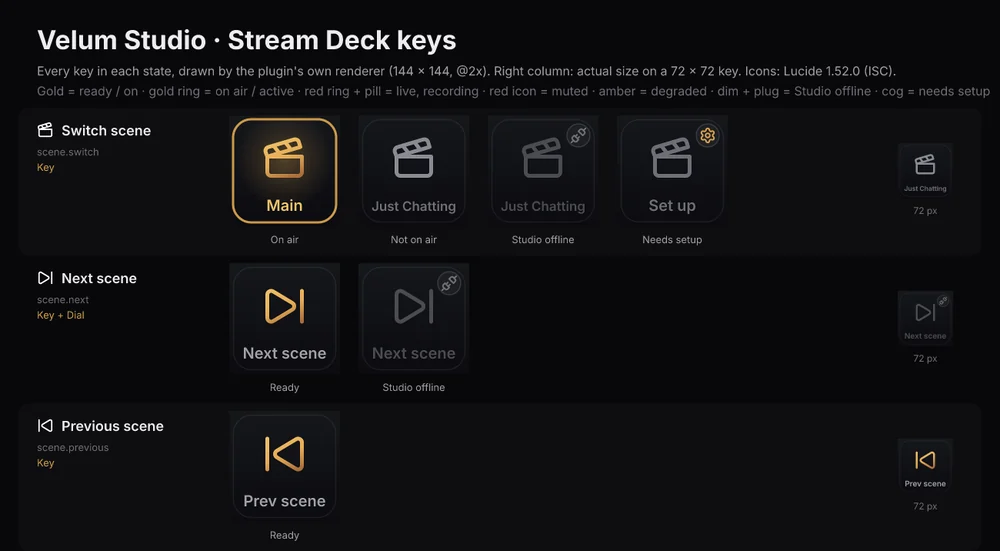
At a glance
- Version 0.8.5.
- Plugin id:
app.velumstudio.studio, by Legendre Media. - Requires Stream Deck 7.1 or later, on macOS 12+ or Windows 10+, or OpenDeck on Linux (with Node.js 20 or later installed). Built on Stream Deck SDK v3 with the Node.js runtime.
- On Linux, in OpenDeck open Plugins, choose Install from file and pick the same
.streamDeckPluginfile. It finds Velum Studio whether it's installed natively, as an AppImage or as a Flatpak. - Connects by itself. Start Velum Studio and the keys connect: there's nothing to type and no token to copy. Each key's settings start with a Studio picker: Active (the first Velum Studio running) or a Studio by name.
- Two key styles, chosen in any key's settings: Velum (the default), the wordmark's marbled champagne-to-blush, and Classic gold.
Every action
Generated from the plugin's own manifest. Each action's id is app.velumstudio.studio. plus its catalog id (with _ as -), so it follows the reference one for one.
| Action | Catalog id | Hardware | What it does |
|---|---|---|---|
| Switch scene | scene.switch | Key | Puts a scene on air. |
| Next scene | scene.next | Key, Dial | Puts the scene after the one on air on air, in the Scenes list's order (wrapping around). |
| Previous scene | scene.previous | Key | Puts the scene before the one on air on air, in the Scenes list's order (wrapping around). |
| Show or hide a layer | layer.visibility | Key | Shows, hides or toggles one layer of a scene. |
| Freeze when its scene comes on air | layer.freeze_on_air | Key | Turns a layer's "Freeze when this scene comes on air" setting on, off, or the other way: while on, the layer shows the picture it had when its scene came on air, and the same source stays live everywhere else. |
| Apply a framing | layer.framing | Key | Moves a layer to one of its framings (a saved position, size and crop), animated as the framing says, from wherever the layer is now. |
| Restart a layer | layer.restart | Key | Plays a layer's show again from its start: its show transition, and a video or animation it shows from its first frame. A hidden layer is shown. (A hide then a show, however close together, does the same.) |
| Clip to the layer below | layer.clip | Key | Turns a layer's "Clip to layer below" on, off, or the other way: while on, the layer shows only where the layer under it has a picture (Photoshop's clipping mask). |
| Layer opacity | layer.opacity | Key, Dial | Sets how see-through a layer is, 0 (gone) to 100 (solid), or moves it by a step (for dials). Its picture, border and glow fade together. Give exactly one of percent or step. |
| Copy a layer's style to another | layer.copy_style | Key | Gives one layer the look of another, as Copy style and Paste style do: its border (with or without its colors), corners, effects, crop, size and place, blend or show and hide transitions. One undo step; parts the other layer can't take are left out. |
| Turn an effect on or off | filter.toggle | Key | Turns one effect (filter) on a source or scene on, off, or the other way. |
| Set an effect's setting | filter.set | Key, Dial | Sets one setting of an effect (filter): a number, on or off, a color, a choice or a file, checked against that effect's own settings (catalog.list has them under filter_settings). A number can also move by a step (for dials) or fade to its new value. Give value or step. |
| Set text | text.set | Key | Changes what a text source says. |
| Mute | audio.mute | Key | Mutes, unmutes or toggles a source's sound. |
| Volume | audio.volume | Key, Dial | Sets a source's volume in dB or on the mixer's 0 to 100 fader scale, or moves it by a step in dB (for dials). Give exactly one of db, percent or step_db. |
| Monitor | audio.monitor | Key | Chooses whether you hear a source in your headphones: off, headphones only, or headphones and stream. |
| Audio track | audio.track | Key | Puts a source's sound on one of Studio's six tracks, takes it off, or toggles it. Recordings record the tracks chosen in Studio's recording settings. |
| Monitor send | audio.monitor_send | Key, Dial | Sets how much of a source is heard on one monitor bus, after its volume and mute. |
| Monitor bus | audio.monitor_bus | Key, Dial | Chooses where a monitor bus plays on this computer and its volume. Omitted settings keep their values. |
| App volume in Windows | audio.app_volume | Key, Dial | Windows' own volume for an app, as its Volume Mixer slider sets it: what you hear. Not what viewers hear (that's the source's fader), though a muted app, or one at 0, is silent for them too. Windows only. |
| What viewers get | veloq.visibility | Key | Chooses where a source's sound goes for Velora viewers over VELoQ: public (viewers get a slider and can adjust it; in the VOD), public_drop_vod (a slider, left out of the VOD: music), hidden_keep_vod or hidden_drop_vod (heard with no slider of its own, in the VOD or not), or not_sent (never leaves Studio). toggle_vod keeps it where it is and flips it in or out of the VOD. Changes that move it to another track apply the next time you go live; a VOD flip on its own slider applies at once. |
| Where viewers start | veloq.viewer_start | Key, Dial | Sets where Velora viewers' slider for a source starts (its own slider over VELoQ), and whether it starts muted. Each viewer can still change it. Give volume_percent, muted, or both. |
| Editor+ stem | veloq.stem | Key | Turns on, off or toggles recording a source as its own Editor+ stem when it's mixed with others (a send, the Stingers track, Other). Viewers never hear stems. |
| Put in a folder or send | veloq.group | Key | Puts a source in an audio folder (it keeps its own slider, shown under the folder's name) or a send (one slider for all its sources), or takes it out when group is left out. |
| Stinger sounds for viewers | veloq.transitions | Key | Chooses where every stinger's sound goes for Velora viewers over VELoQ (the Transitions channel): hidden_keep_vod by default (heard in the Stingers track, in the VOD). |
| Smart defaults | veloq.smart_defaults | Key | Gives sources their smart first choice for Velora viewers: microphones, calls, game and alerts get a slider; music gets a slider but stays out of the VOD; stingers and media files are heard with no slider. With folders, also sorts them into Voice, Game, Music and Alerts folders (made when missing). One source, or every source with sound. |
| Send to Velora with | veloq.send_with | Key | Chooses how Studio sends to Velora: whip (one mixed track, the default) or veloq (Velora's own protocol: a track per source viewers can mix), and over VELoQ how many qualities (layers, 1 to 4; 0 = the default, 2). Applies the next time you go live. |
| Viewer sliders | veloq.sliders | Key | Shows how many of the 8 viewer sliders a VELoQ Go Live gives out now (sources and sends). |
| Point a Mirror | mirror.show | Key | Chooses what a Mirror source shows: another source with a picture, or nothing. |
| Set a source's setting | source.set | Key, Dial | Sets one setting of a source: an avatar's expression, camera, light or outfit (what its plugin lets a Stream Deck change), or an Aurora's. Saved with the collection, like a change in Studio's Inspector. |
| Trigger a source's action | source.trigger | Key | Presses one of a plugin source's buttons, as its Inspector does: an avatar's Toggle expression, for one. Nothing is saved. |
| Record this source separately | source.record_separately | Key | Records a clean source feed beside the next program recording, when the encoder budget allows it. Options left out keep their settings; mode defaults to toggle. Audio defaults to none. |
| Media control | media.control | Key, Dial | Plays, pauses, restarts, stops or seeks a media source (a video, a sound or a playlist), or moves a playlist to its next or previous item. With seek_ms and an action, it seeks first ("seek to 30 s and play"); with seek_ms alone, a paused source stays paused. |
| Studio mode | studio.mode | Key | Turns studio mode on, off, or the other way: on, a preview scene sits next to what's on air, edits happen there, and Take puts it on air with the transition. Turning it on previews the scene on air. |
| Preview a scene | scene.preview | Key | Puts a scene in studio mode's preview, for the next Take (turning studio mode on if it's off). What's on air doesn't change. |
| Take | studio.take | Key | In studio mode, puts the preview scene on air with the transition into it; what was on air becomes the preview, so a second Take goes back. |
| Wait until the transition finishes | transition.wait | Key | Answers once the scene transition playing now has finished (after a moment's look when none is playing, so a switch sent just before is waited for). A controller holds the presses after it until then: switch, wait, then show a layer. |
| Set the transition | transition.set | Key | Sets the transition a scene switch plays (unless the incoming scene has its own), how long it takes and whether it plays reversed, as the transition picker, duration and Reverse next to Take do. Give a type, the name of a saved transition, a duration, reverse, or any of them together. |
| Set a scene's transition | scene.transition_override | Key | Sets the transition that plays whenever a scene comes on air (its "transition into this scene"), in place of the default; "default" clears it. |
| Screenshot | output.screenshot | Key | Saves a picture (PNG or JPEG) of what's on air, a scene, one source, or the capture(s) showing, at full resolution, in Studio's screenshot folder or one you choose. |
| Start recording | record.start | Key | Starts recording what's on air to a file. |
| Pause recording | record.pause | Key | Pauses the recording, resumes it, or toggles. The file carries on in one piece when it resumes: no gap, sound and picture together, and its length leaves the paused time out. |
| Stop recording | record.stop | Key | Stops the recording and saves the file. |
| Record | record.toggle | Key | Starts recording, or stops it if it's running. |
| Start replay buffer | replay.start | Key | Starts keeping the last seconds of what's on air in memory (as long as Studio's replay buffer setting says), ready for Save replay. |
| Stop replay buffer | replay.stop | Key | Stops the replay buffer; what it held is let go. |
| Replay buffer | replay.toggle | Key | Starts the replay buffer, or stops it if it's running. |
| Save replay | replay.save | Key | Saves the replay buffer's last seconds to an MP4, in the replay buffer's folder (Studio's recordings folder) or one you choose, named like screenshots. Returns where it went. |
| Go live | stream.golive | Key | Goes live to every destination that's on, or to the one given. Already live, it starts the destinations that are on (or the one given) but not live yet, beside the others, and says which it started. |
| End stream | stream.stop | Key | Ends the stream. Viewers see it end, so it needs "confirm": true; a key should also ask for a long press. |
| Select destination | destination.select | Key | Chooses where Go live sends the stream. |
| Go live on a destination | destination.start | Key | Starts the stream to one destination. While live, it joins the destinations already going out (the others carry on); offline, Studio goes live to it alone. |
| End a destination's stream | destination.stop | Key | Ends the stream to one destination at once; the others carry on (ending the only one ends the stream). Its viewers see the stream end, so it needs "confirm": true. |
| Audio sent | destination.audio | Key | What a platform's live audio is: the full mix, or without the sources marked Live only (music, alerts), which keeps them out of its VOD. Its live viewers don't hear them either. Applies the next time it goes live; not for Velora. |
| Destination health | destination.health | Key | Shows a destination's own state and health, while multistreaming too: offline, connecting, live, reconnecting or error (with why), with bitrate, packet loss, round trip and reconnects while live. |
| Start virtual camera | vcam.start | Key | Turns on the virtual camera so video-call apps can show what's on air. |
| Stop virtual camera | vcam.stop | Key | Turns off the virtual camera. |
| Virtual camera | vcam.toggle | Key | Turns the virtual camera on, or off if it's on. |
| Stats | stats.show | Key, Dial | Shows Studio's live numbers: frames rendered and late, and while live the bitrate, packet loss and round trip; while recording, frames dropped. |
| Viewers | stream.viewers | Key | Shows how many are watching on each platform that says, while live. |
| Set title and category | streaminfo.apply | Key | Applies a title, category and tags (any of them) to Studio's stream info and sends it to every platform lit in the Stream manager, or to the platforms given. |
| Send a chat message | chat.send | Key | Sends a message to the chats lit under All in the chat panel (the same "Sends to" row), or to the platforms given. Limited to a few messages a minute per connection. |
| Chat mode | chat.mode | Key | Turns a chat mode on or off: slow mode, followers-only, subscribers-only or emote-only. |
| Clear chat | chat.clear | Key | Clears a platform's chat for everyone. Viewers see every message go, so it needs "confirm": true; a key should also ask for a long press. |
| Check for updates | update.check | Key | Asks Studio's update channel whether there's a newer Studio, as Check for updates in the Help menu does, and returns once it knows. Nothing is downloaded. |
| Install update | update.install | Key | Downloads the update on offer and checks its signature and checksum, ready to restart into, as Update now does. Refused while live, recording or keeping a replay buffer: updates never start then. With restart, Studio restarts into the new version once it's ready. |
| Run an automation | automation.run | Key | Runs an automation now, whatever its trigger (its Run button). |
| Set a variable | variable.set | Key | Sets an automation variable: what {var:name} shows in a text layer and an automation's If can check. Empty forgets it. Kept by Studio across restarts. |
| Turn an automation on or off | automation.enable | Key | Turns an automation on (it runs when its trigger fires), off, or the other way. |
| Switch scene collection | collection.switch | Key | Opens another scene collection, as Studio's collection menu does: its scenes, sources and automations take the place of the open one's. |
| Set a Dynamic Sources variable | dynamic.set_variable | Key | Sets a variable Dynamic Sources choose by: the category or the title (the date and time is the computer's clock). This changes what Dynamic Sources show without changing the stream's category or title on any platform. |
| Raw request | raw.transaction | Key | The escape hatch: commits scene-model commands as one transaction, all or nothing, exactly as Studio's own panels do (see the model's command reference). Changes made this way aren't undo steps. |
| Avatar lip sync | avatar.lipsync | Key | Turns a lip-sync pairing on or off: a voice moving an avatar's mouth in an avatar app over VMC (Settings › Avatars). Off, the avatar's mouth closes and Studio stops sending to it. Needs Avatars turned on (Settings › Advanced › Avatars). |
Keys and dials
| Look | Means |
|---|---|
| Ring and glow | On: the scene on air, a visible layer, an effect that's on, monitoring, the selected destination |
| Red ring and pill | Live or recording (LIVE with the uptime, REC with the length) |
Red icon and MUTED |
Muted |
| Amber | Starting, reconnecting, or losing packets |
| Dimmed, with a plug badge | Studio isn't running or isn't connected |
| Cog badge | The key needs settings, or what it points at was deleted |
| A ring filling around the edge | A long press in progress |
On a Stream Deck + dial, audio.volume steps dB and a push mutes; filter.set steps the chosen setting (a hundredth of its range per detent unless set) and a push resets it; scene.next turns to pick and presses to take; stats.show turns through its readings; and veloq.viewer_start moves where Velora viewers' slider for a source starts (5% a detent unless set) and a push flips whether it starts muted.
Destination health shows a destination's bitrate while it's live. When Studio has no bitrate for it (RTMP and SRT destinations, such as Twitch, before a coming Studio beta), it shows how long it's been live instead.
In a key's settings, the Layer list follows your Scenes list, with the scene on air first and groups after. A layer whose name is used in more than one scene says which scene it's in ("16x9 Camera · Main"), so the key controls the one you mean.
Source lists (Mute, Volume, Monitor and every other source picker) work the same way: your sources are listed under the scenes they're in, with the scene on air first, then your Scenes list's order, then groups and nested scenes. Within a scene, the top layer comes first. A source in several scenes shows under each, and picking it from any of them picks the same source. Sources that aren't in any scene come last, under Not in a scene. While a key's settings are open, the list follows your scenes as they change.
Safety
- End stream, End a destination's stream and Clear chat need a long press by default (1, 2, 3 or 5 seconds; 2 by default). A tap shows "Hold 2s" and sends nothing, and a Multi Action, which can't hold, refuses them with an alert.
- Each has a Require hold to end setting (Require hold to clear on Clear chat), on by default. Turn it off and a press runs the action at once, once, and it works in a Multi Action: behind a confirm page, say, End stream, then a blank scene, then back to the main page.
- Go live can end the stream with the same long press while live (on by default, and can be turned off).
- Ban, time out and Delete a message have no Stream Deck action, on purpose: each is about one person or one message, which a key can't point at.
How it connects
Stream Deck ── plugin (Node) ──── ws://127.0.0.1:<port>/ (velum/1, Bearer token) ──── Velum Studio
                  │  one connection per running Studio, found in control.json
└─ Property Inspector asks the plugin, never Studio- Discovery. It reads Studio's
control.json, skipping entries whose process isn't running, every 2 seconds, whenever Stream Deck reports Studio launching or quitting, and before every reconnect. - Auth. The token goes in
Authorization: Bearer, and the plugin names itself withX-Velum-Client: Stream Deck. The token is never logged, saved in settings, or sent to the Property Inspector. - Reconnecting. Backoff starts at 0.5 seconds and doubles to 10. A
401re-reads the discovery file within a second. Apingevery 15 seconds catches a Studio that has stopped answering. - Live state. Each key leases the topics it shows; the plugin follows the union of them and lets go of the rest, so
metersis never followed unless a key needs it. A key reads its value with the catalog action's own state rule. - Settings store ids, chosen from pickers filled with live state. Labels are looked up by id on every draw, so they follow renames.
What Velora viewers hear
Keys for VELoQ, CLEARLYlogic's transport technology built around Velora.tv's player, where each source can have its own slider in the viewer's mixer:
| Key | Shows |
|---|---|
What viewers get (veloq.visibility) |
Lit while the source already goes where the key sends it, with a pill: SLIDER, SLIDER · NO VOD, HEARD, HEARD · NO VOD or NOT SENT; set to flip the VOD, IN VOD or NO VOD |
Where viewers start (veloq.viewer_start) |
The start as a percentage with a bar, and MUTED; a key or a dial |
Editor+ stem (veloq.stem) |
STEM while the source is recorded as its own stem |
Put in a folder or send (veloq.group) |
The folder's or send's name; NO FOLDER for a key that takes the source out |
Stinger sounds for viewers (veloq.transitions) |
Where stinger sounds go |
Smart defaults (veloq.smart_defaults) |
+ FOLDERS when it also sorts sources into folders |
Send to Velora with (veloq.send_with) |
Now VELoQ · 3, the qualities Studio sends to Velora, from the velora destination, and Next go live while live, since a change applies then |
Viewer sliders (veloq.sliders) |
Sliders taken, such as 2/8, amber once all eight are |
The folder picker lists folders, then sends, with None first. Making, renaming and deleting folders, and a source's place in who gets a slider first, are one-time setup with no key: a key would make another folder on every press, or delete one with nothing on the key to undo it. Do those in Studio's What viewers can mix, or with the API.
Screenshots, in one press
One output.screenshot key can save a capture card at full resolution, as a JPEG named after the stream title, into a thumbnails folder. Picture of (program, scene or source), folder (a full path, checked as you type), name (date and time, random, or a pattern with {date} {time} {what} {title} {category} {random}), PNG or JPEG with its quality, and an optional box to fit inside. After a shot, the key shows a check and the saved file's name for three seconds.
Effect settings
filter.set offers only the chosen effect's real settings, read from the effect's type in the filters topic and its schema, with their titles and units. A press can set a value, fade to it, step by an amount, or reset to the default, and the key shows the current value as a pill.